
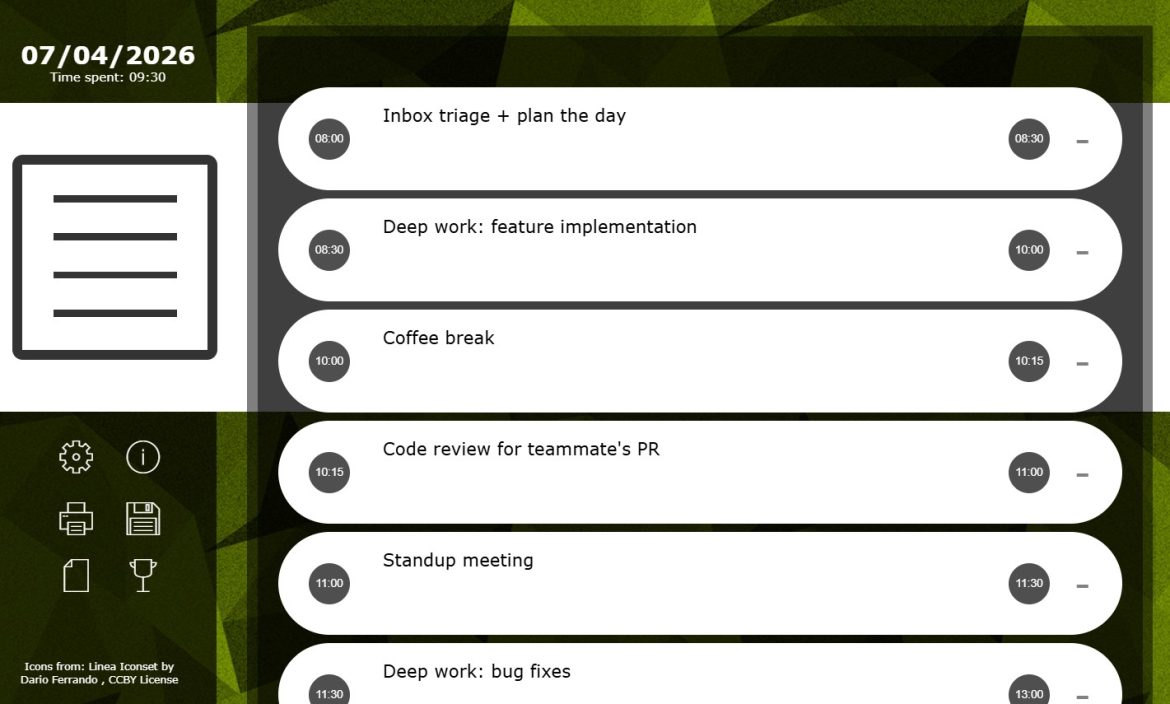
A decade ago I went looking for a way to plan my day and keep a record of how I actually spent it. I tried task managers, calendar hacks, and a few “all-in-one” productivity suites, and none of them stuck. So I built my own: Daily Log. It’s been my daily driver ever since — which also means ten years of using my own tool often enough to know exactly what to keep and what to leave out.
It’s a single page. There’s no sign-up, no dashboard tour, no onboarding checklist. You open it, and you start logging your day.
What Daily Log Actually Is
Daily Log is a browser-based tool for planning your day in time blocks and keeping a running record of what you did. There’s no account system and no server backing it up — the entire app lives and dies in your browser tab. A few things stand out immediately from how it’s built:
- Today’s log is stored locally in the browser’s local storage. Nothing is sent anywhere — the current day’s data never leaves your machine. It’s session storage for the day, not a long-term database.
- A log is not accessible from another device. It’s tied to the browser you’re using, which is a deliberate constraint, not a missing feature — more on that below.
- New tabs don’t fork your log. Opening a new tab just opens your current log, so you’re never accidentally working from two different versions of your day.
- The print icon is the archive. When you want to keep a permanent record of a day, you print the log to PDF and save it to disk yourself. That one action turns an ephemeral session into a file you own, on your own terms.
- Small conveniences that respect your flow: the background you pick is remembered automatically,
Ctrl + Ssaves your log,Esccloses any open modal, and there’s a trophy icon to click when you’ve earned a small reward at the end of a work day.
That’s the whole feature list. And that’s exactly the point.
Why Minimalism Is the Feature, Not the Limitation
Most productivity tools grow features the way barnacles grow on a hull. Tags, integrations, notifications, recurring task engines, team dashboards — each one solves a real problem for someone, but together they add friction to the one thing a daily log needs to do well: let you write down what you’re doing, right now, without thinking about the tool itself.
Over ten years, the thing I’ve valued most about Daily Log is that it has never asked me to learn it. There’s no manual. You open it, you type into a time block, you move to the next one. The absence of configuration is what makes it something I’ve actually used every single day rather than something I set up once, admired, and abandoned a week later — which is the fate of most “sophisticated” systems I’ve tried.
A simple log doesn’t compete for your attention. It just sits there, doing one job.
How I’ve Used It to Plan My Days
My routine hasn’t changed much in ten years, which is itself a testament to how well the tool fits the task:
- Morning block-out. Before starting work, I rough in blocks for the day — not to the minute, just enough structure to know what “now” is supposed to be.
- Log as I go. As tasks shift or take longer than expected, I update the block rather than fighting the plan. The log adapts to the day instead of the day being forced into a rigid plan.
- End-of-day review. At the end of the day, the log is a plain record of what actually happened — a much more honest document than any calendar invite ever is.
- The trophy click. A small, slightly silly ritual, but closing the day with a deliberate action (rather than just switching tabs) helps mark the boundary between work and everything else.
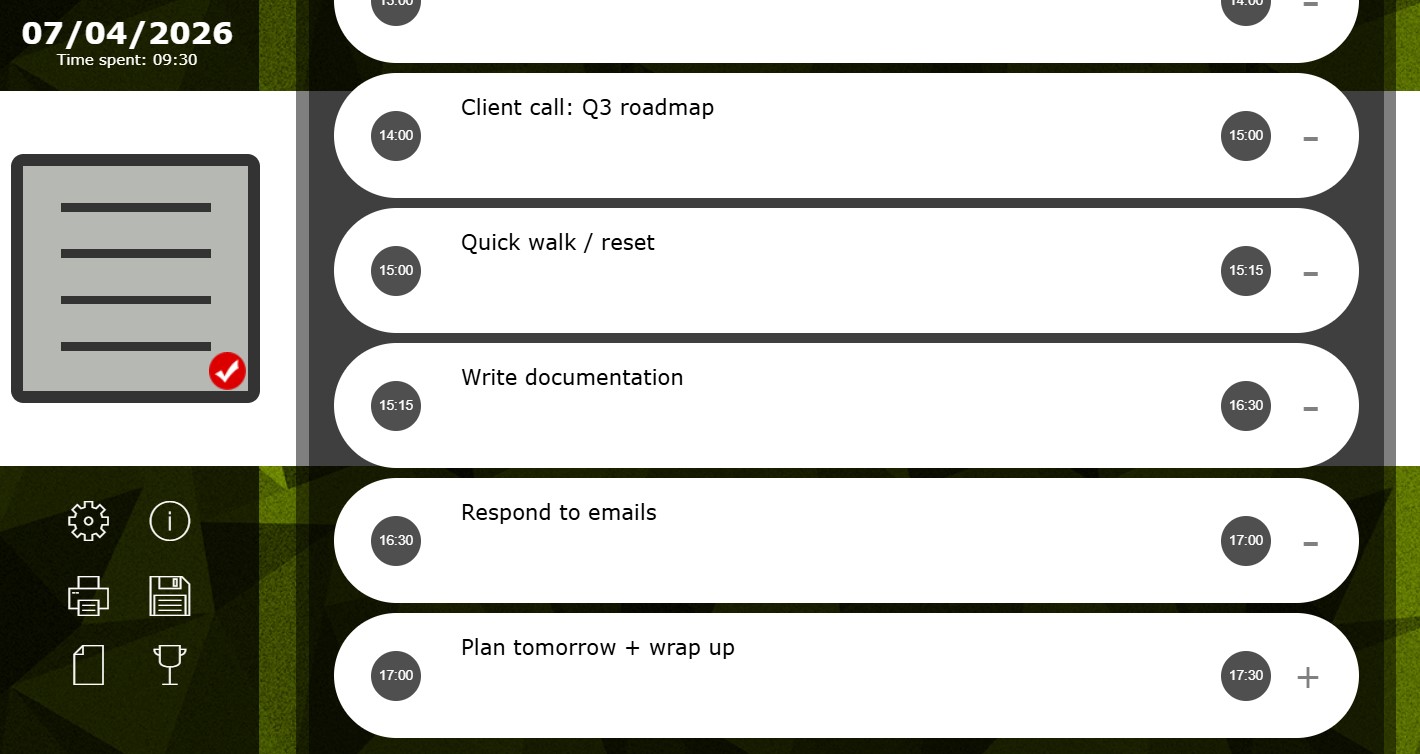
The Time Selector: Three Clicks, Any Time
The one piece of real “interface” in Daily Log is the time picker, and it’s the part of the design I spent the most thought on — everything else in the app is intentionally plain, but getting a person from “I need to set a time” to “the time is set” had to be fast enough that it never became a reason to skip logging.
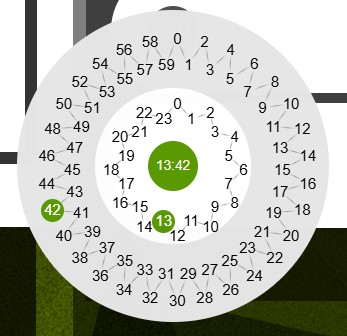
Instead of a scroll wheel, a dropdown, or a text field you have to type digits into, I built it as two concentric dials: an inner ring for the hour (0–23) and an outer ring for the minute (0–59), each split into two staggered rows so all the numbers stay legible around the circle. You tap the hour, tap the minute, and the center of the dial confirms the selection — 13:42 in this example, with both the hour and the minute lighting up green on their respective rings as you go.
The design goal was a deterministic three-click sequence: click the green disc to open, click the hour, click the minute, done. It doesn’t matter if you’re setting 12:01 or 23:59 — the number of interactions is always the same. That was a deliberate rejection of the usual alternatives:
- Scroll wheels make the cost of selecting a time depend on how far you have to scroll from wherever the wheel currently sits. Jumping from 9:00 AM to 11:45 PM can mean dozens of flicks.
- Text input requires typing four digits plus getting the format right (and dealing with AM/PM, or a colon, or validation errors), and typing is a much easier action to mistype or get interrupted mid-way through.
- Dropdown-in-dropdown pickers usually mean opening a list, scrolling to find the value, closing it, then repeating for the second field — an unpredictable number of scrolls and clicks depending on where the value sits in the list.
I wanted none of that variance. The dial collapses the whole interaction into a fixed, low, predictable cost: two taps to pick, and the time is set — no matter what time it is. For a tool whose entire job is getting you to log time blocks as you’re working, that predictability matters more than it sounds like it should. Every extra decision or fumble at the moment of logging is a small excuse to skip the log instead — “I’ll just remember and fill it in later,” which is exactly the habit a daily log is meant to prevent. Because the interaction cost of setting any time is always the same three clicks, there’s no moment where the tool is fast for round numbers and slow for anything else. It’s just fast, every time — which is exactly what I was aiming for when I designed it, and a big part of why it’s stayed frictionless enough to survive ten years of my own daily use.
Local, Private, and Yours to Keep
Daily Log doesn’t sync to a cloud account, doesn’t have a login screen, and doesn’t ask for your email. The current day’s log lives in your browser’s local storage — session storage for today, not a long-term database — which means no data leaves your machine, there’s no account to manage or have compromised, and it works with no dependency on an internet connection.
Permanence is handed to you deliberately rather than assumed for you. When you want to keep a day for good, you print the log to PDF and save it wherever you keep your own records. That one click is what turns an ephemeral session into a paper trail: over ten years it’s added up to a folder of dated PDFs I’ve referred back to when settling disputes about timelines, remembering why I made a decision, or just seeing how a stretch of months was actually structured — all without a database, a login, or a subscription.
The tradeoff is real and worth naming honestly: nothing is kept for you automatically, and if you forget to print a day before closing the tab, that day’s log is gone. I designed it that way on purpose — I’d rather the tool never silently accumulate a database of my activity in the background than have it quietly retain more than I meant to keep. Printing is a single deliberate click, and it puts you in control of exactly what gets archived and where it lives.
The Real Lesson: Boring Tools Last
Ten years is a long time for any piece of software to stay part of a daily routine unchanged. Most tools I’ve adopted with more enthusiasm didn’t survive a year. What did survive was the one that asked the least of me — no account, no sync, no sophistication, just a blank set of time blocks waiting to be filled in.
If you’re looking for a way to plan your day and keep an honest, private, local record of it, you don’t need a project management suite. You need something you’ll actually open tomorrow. For me, that’s still https://sheriftolba.com/dailylog/, a decade in.
Leave a Reply